When two people take care of a newborn, the baby tracker stops being a diary and becomes a handoff tool. One of you logs the 2 a.m. feed, the other takes the 5 a.m. one, and the log is the only thing that remembers what happened in between. When it works, nobody has to wake anyone up to ask. When it doesn't, it's worse than paper, because you trust a number that's wrong.
We read 721 recent negative reviews of the most used breastfeeding and baby tracker apps before building ours. 125 of them were about sharing with a partner. The problems fall into a handful of patterns.
The five ways partner sync breaks
1. It's slow
The most common complaint: a feed logged on one phone takes minutes or hours to appear on the other. Some apps only sync when the app is open on both phones, or when they reconnect to their servers. At night, that means the partner who just woke up sees an old log.
2. It needs an account, and the account breaks
Many apps sync through a user account. That brings sign-in screens, password resets and, in reviews, sessions that log one parent out at the worst possible moment.
3. It doesn't cross platforms
If one of you has an iPhone and the other an Android phone, a surprising number of apps can't share at all. Some only sync through iCloud, which leaves the Android parent out.
4. Each person pays
Some apps charge a subscription per person, so sharing with your partner doubles the price. 24 of those 125 reviews were specifically about paying twice or paying just to sync.
5. Offline means lost
Phones lose signal in hospital rooms, basements and the back seat of a car. If an app only saves feeds on its server, a feed logged with no connection can vanish.
What to test in the first 48 hours
Whatever app you choose, try this before you rely on it:
- Log a feed on one phone and time how long it takes to show on the other. It should be seconds, with both apps in the background.
- Edit that feed on the second phone. Change the end time. Check that the first phone updates.
- Put one phone in airplane mode, log a diaper, then turn it back on. The entry should still be there and should reach the other phone.
- Check the price page for "per user" or "per person." You want one purchase for the household.
- Find out what happens if you change phones. The log should come with you.
Splitting the night with one log
A shared tracker helps most with how you divide the work. Some common setups parents tell us about:
- Shifts. One partner covers the night until a set hour and the other takes over. Whoever starts a shift checks the last feed, the side and the last diaper on the log, not by asking.
- Bottle by the partner. If you combo feed or give pumped milk, the partner handles one bottle and logs it. The breastfeeding parent sees it on their phone in the morning.
- One logger per feed. Whoever is holding the baby logs it. With live sync, it doesn't matter whose phone it is.
How you feed your baby and on what schedule is a conversation for you and your pediatrician or lactation consultant. The log just keeps both of you working from the same facts.
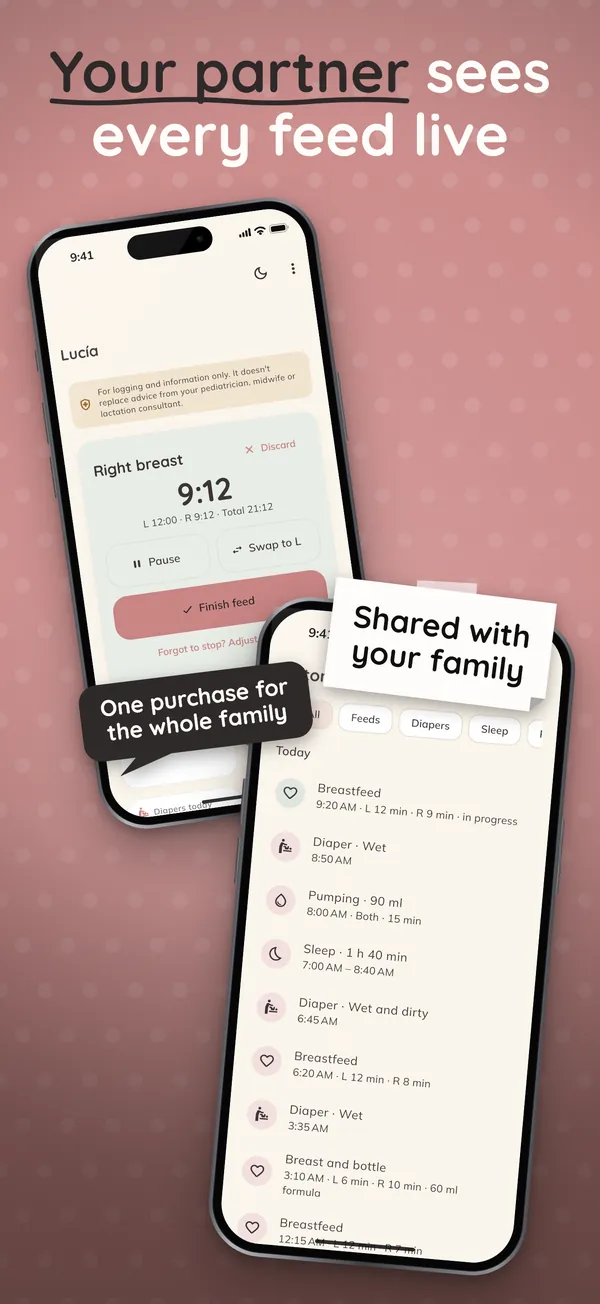
How Breastfeeding, Bottle & Diaper does it
We designed sharing around those five failures:
- Real time. A feed logged on one phone appears on the other within moments, through our relay server.
- No accounts. In Settings you create a family code; your partner types it or scans its QR code. That's the whole setup. No email, no password, no sign-in that can expire.
- Android only for now. The app is on Google Play only.
- One purchase for the family. Live sharing is part of the family plan: $19.99 a year with a one-month free trial, or $14.99 once. It covers up to 8 phones, so grandparents or a nanny can join, and nobody pays again.
- Offline first. Every entry is saved on the phone the moment you tap. If there's no signal, it syncs when the connection comes back.
- End-to-end encrypted. The relay only passes along data it can't read. We can't see your baby's log.
- Recovery. On a new phone, the family code brings the whole history back.
Logging itself is free forever, with no limit and no ads: feeds with a timer per side, bottles, combo feeds, diapers, sleep and pumping. If you're still comparing apps, our comparison of the best breastfeeding tracker apps lists where others beat us, including one that shares for free.
Quick answers
Can my partner use the app without paying?
Your partner can install it and log for free on their own phone. Seeing each other's entries live needs the family plan, and one purchase covers both of you.
What if we only want to share for the first few months?
The one-month trial is a good test run. If you keep the plan and later cancel, you go back to logging on each phone separately. Nothing you've logged is ever deleted or locked.
Does it show which side is next on both phones?
Yes. The app tracks the side each feed ended on and shows "Next: Right breast" or "Next: Left breast" on both phones. More on that in how to remember which side to breastfeed.