Forgetting which side you nursed on last is close to universal in the newborn weeks. It's not a memory problem. It's sleep deprivation, darkness and a schedule with no beginning or end. The question comes up for whoever is on duty: the nursing parent, the partner bringing the baby over, the grandparent helping out for a week.
One thing up front: this article is about remembering, not about rules. Many lactation consultants suggest starting the next feed on the side you finished on, or on the side that was used less, and some families do something else entirely. What's right for you is a question for your pediatrician or an IBCLC. Here we only cover how to keep track of what you did.
The low-tech methods
| Method | Works in the dark | Partner can see it | Records the time |
|---|---|---|---|
| Hair tie or bracelet you switch wrists | Yes | No | No |
| Safety pin or clip on the bra strap | Yes | No | No |
| Notebook by the bed | Needs a light | If they check it | Yes |
| Whiteboard on the fridge | No | Yes | Yes |
| Phone note or text to yourself | Yes, with a bright screen | Only if shared | Yes |
Hair tie or bracelet
Move it to the wrist on the side you'll start with next. It's the most common trick because it needs nothing and works with your eyes half closed. The catch: it only lives on your body. If your partner gets up, they still have to ask.
Safety pin or nursing clip
Same idea, attached to the bra strap or nightgown on the side that's next. It's right where you need it, but it falls off, goes into the laundry and, again, nobody else sees it.
Notebook
A simple log with time, side, minutes and any bottle. Some hospitals hand out a printed version for the first days, because it's useful at the first pediatric checkups. It's the only low-tech option that keeps a history, but it needs a light, a pen and handwriting you can read at 9 a.m.
Fridge whiteboard
Great for households with several caregivers during the day. Useless at night, when nobody wants to walk to the kitchen.
A note on your phone
"L 3:40" in a notes app is better than nothing. But your phone doesn't time the feed, doesn't remind you which side is next and makes you type one-handed while holding a baby.
The app method
A breastfeeding timer app does what the tricks above can't do together: it times each side, keeps the history, and tells you which side is next without you having to think. If it's shared, your partner sees the same thing.
Two things to check before you rely on one, based on the reviews we read of the most used trackers:
- Can you fix a mistake? If you tap the wrong side, you need to be able to change it afterward. 69 of the 721 negative reviews we read complained about not being able to edit a feed or add one manually.
- Are both sides one feed? Some apps log each side as a separate feed, which clutters the history and makes the count look doubled.
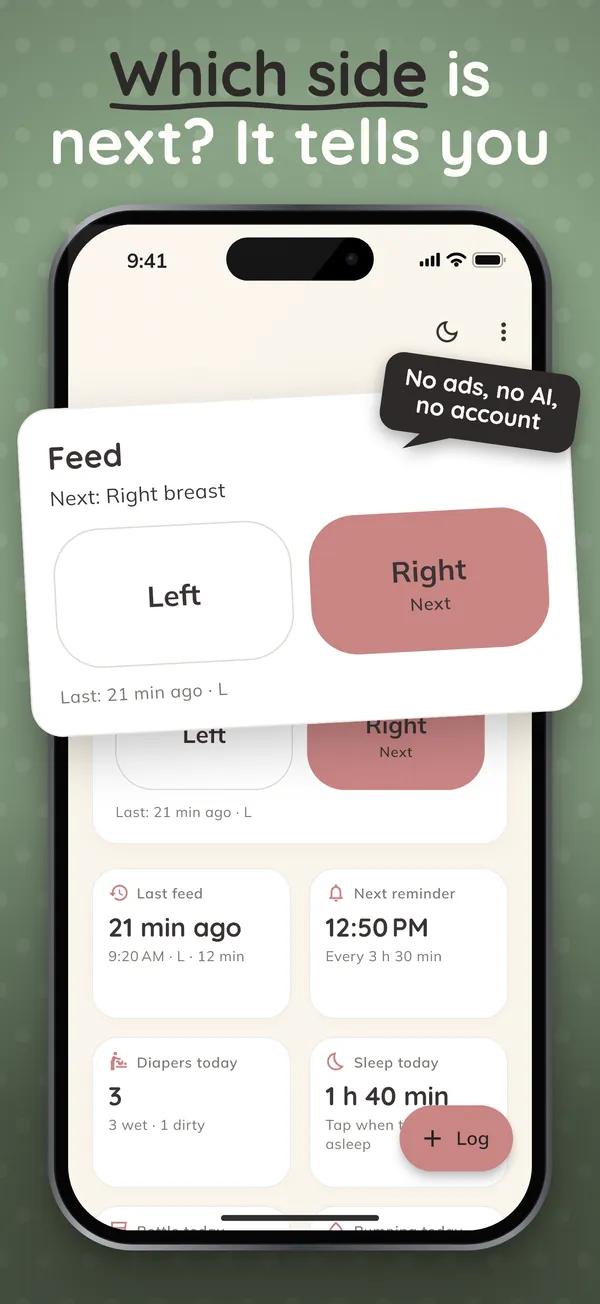
How Breastfeeding, Bottle & Diaper handles it
Tap Left or Right to start the timer for that side. Switch mid-feed and the time for each side is kept separately, inside the same feed. When you stop, the app knows which side you ended on and shows "Next: Right breast" (or left) on the main screen. Tapped the wrong one? Edit it later, for free.
For nights specifically:
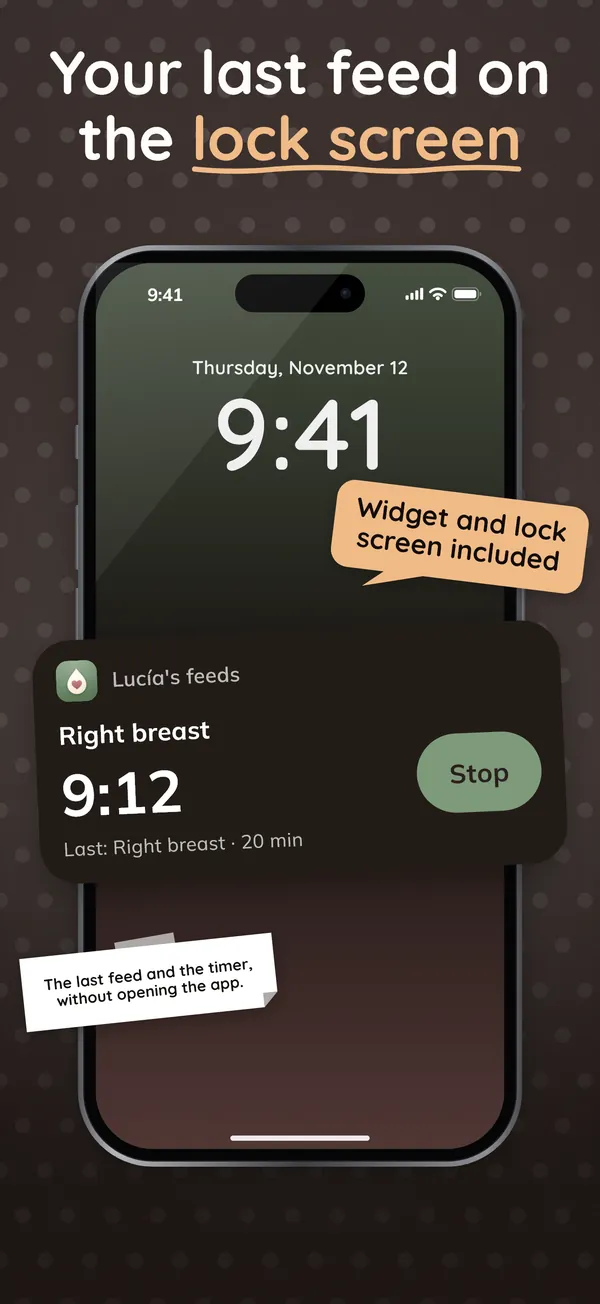
- Lock screen timer. On Android it's a persistent notification with the elapsed time and a stop button. No unlocking needed.
- Home screen widget with the last feed and the next side, plus buttons to start a feed.
- Night mode with low brightness so you don't wake anyone up.
With the family plan, your partner sees the same "Next" on their phone in real time. How that works is in our guide to a baby tracker app you can share with your partner.
A ten-second routine
Whatever method you pick, the trick is to record the side at the end of the feed, not the start of the next one. By then you've forgotten.
- Baby unlatches or finishes the bottle.
- Switch the hair tie, move the pin or tap stop in the app.
- Done. The next person on duty can see where to start.
Common questions
Do you have to switch sides at every feed?
Practices vary, and it depends on you and your baby. Ask your lactation consultant or pediatrician. The app simply suggests the other side based on what you logged, and you can always start wherever you want.
What if the baby only nursed on one side?
Log it as a one-sided feed. The app will suggest the other side next time.
What if there was a bottle too?
Add it to the same feed, in mL or oz, as breast milk or formula. For everything else worth logging, see our breastfeeding tracker app guide.
Is this free?
Yes. Timing each side, the next-side reminder, the widget and the lock screen timer are free forever, with no ads. Live sharing, charts and a PDF report for the pediatrician are in the paid family plan. You can see how that compares in our best breastfeeding tracker apps roundup.