Most "best blood pressure app" lists compare charts and color schemes. We used a different yardstick, the one that matters when you're the patient: after a week of readings, what can you actually put in front of your doctor? The American Heart Association asks people who monitor at home to take two readings one minute apart, at the same time each day, and keep a log. An app either makes that easy or it doesn't.
The test
On November 15, 2026, we installed the four most installed blood pressure apps on Google Play on an Android 15 test phone (signed in to the Spanish Play Store, so prices showed in euros), using each the way a new user would: no purchases, no accounts, no sign-in. We logged the same readings in each and then tried to get a report out.
| App (Google Play) | Installs | Report you can hand over | Ads we saw | What it charges |
|---|---|---|---|---|
| My Heart (Klimaszewski) | 10M+ | PDF, but with readings from a single day it said "too little data" and wouldn't export | Fixed banner on every screen | €1.39/month or €8.49/year in Spain, 12-day free trial |
| Blood Pressure Diary (AI Lab) | 1M+ | CSV only, no PDF | Fixed banner above the numbers | Nothing |
| Blood Pressure Tracker (aadhk) | 1M+ | PDF behind a one-time upgrade | Banner and a video ad inside the list of readings | €11.99 once in Spain; US store range $0.99–$29.99 |
| Blood Pressure Monitor (QR Code Scanner) | 50M+ | CSV only, no PDF | Full-screen ad on launch and before logging | Not clear; we hit no paywall |
The most installed of the four, at 50M+, also spends a whole onboarding screen on "measuring" blood pressure with your fingertip on the camera. What that screen produced was a pulse in beats per minute, not a blood pressure.
On the "ads" column: on November 18, aadhk's store listing no longer shows the "Contains ads" label. We're reporting what we saw three days earlier.
The same reading, four different labels
We also noticed something you'd only catch by using several apps side by side. A reading of 128/82 was labeled "Elevated" in one app, "Prehypertension" in another and "Stage 1 Hypertension" in the other two. Each was using a different chart, and none of them told the difference between a reading taken at home and one taken in a clinic. One reading never makes a diagnosis anyway; guidelines work with averages over several days.
The iPhone side
Ours isn't on iPhone yet, so here's the App Store for "blood pressure log" and "blood pressure tracker" on November 18, 2026:
| App | US ratings | Price list in the store |
|---|---|---|
| Blood Pressure Tracker SmartBP | 61,398 (4.50) | $14.99/month or $39.99/year; ad-free with cloud $99.99 |
| Blood Pressure Log, Heart Rate | 34,199 (4.33) | $7.99–$9.99 a week or $39.99 a year |
| Blood Pressure Tracker • | 16,017 (4.67) | $8.99/month or $39.99/year |
| BP diary (self-monitoring) | 8,944 (4.87) | Nothing |
| Blood Pressure Log and Tracker | 3,373 (4.79) | $0.99/week, $2.99/month or Pro $23.99 |
Weekly subscriptions for a log are worth a second look before you tap "continue."
Where the others beat ours
- Price on Google Play. AI Lab is free (with ads), and aadhk's one-time upgrade can cost less than ours.
- Reading the monitor with the camera. My Heart can read the numbers off your monitor's screen; in our test it did so correctly when the display was well framed. Ours doesn't do that in this version.
- Fast entry. aadhk's form with a number pad was the quickest of the four.
- Bluetooth monitors. Some apps pair with specific cuffs. Ours doesn't.
- History. Millions of installs and thousands of ratings; ours is new this month and unrated.
What ours still lacks
- Android only for now.
- Paid: full history and charts beyond the last week, PDFs for 30 days or a custom date range, Health Connect sync, multiple profiles and the widget. $12.99/year, first month free, or $19.99 for life.
- No camera reading and no Bluetooth.
What ours does differently
- It never pretends to measure. The first screen says so: log what your cuff shows.
- The 7-day check, free: 3 to 7 days (7 by default), morning and evening, two readings with a one-minute countdown between them, and the averages at the end: morning, evening and overall.
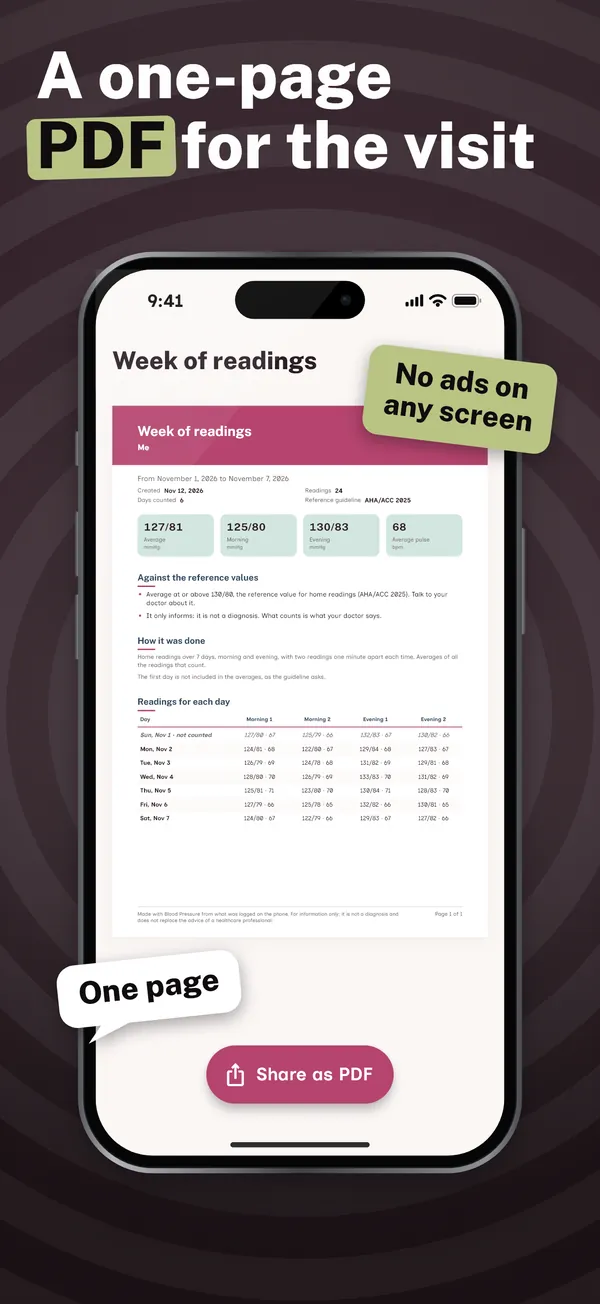
- A one-page PDF of that week, free, from the very first week.
- No labels on single readings. Instead, the home-reading reference value of the guideline you pick, with its source: AHA/ACC 2025 (130/80) by default in the US, or the European or Japanese guideline (135/85). Plus your doctor's target, if you enter it.
- Large keys and numbers, a simple mode, reminders for readings and medication (no doses stored), CSV export and an encrypted backup. No account and no ads, ever.
How to choose in five minutes
Install the app, log one fake reading, and try to export a report. Note whether it asks you to pay, shows an ad, or tells you your numbers are a "stage." Then delete the fake reading. If you're starting a home log, read how to keep a blood pressure log sheet your doctor can use. If you've seen apps that "measure" with your finger, read whether your phone can measure blood pressure. See ours on its page.